

GST billing app for Android Bill fast.
Get paid.

Make GST bills, estimates and receipts, record payments and see who still owes you, all on your phone. Works without internet. No sign-up.

Get it on Google Play

Free to use, with no limit on bills.
Optional Lifetime unlock: ₹999, one time.

  • Works offline
  • No sign-up
  • No ads
  • Your data stays on your phone
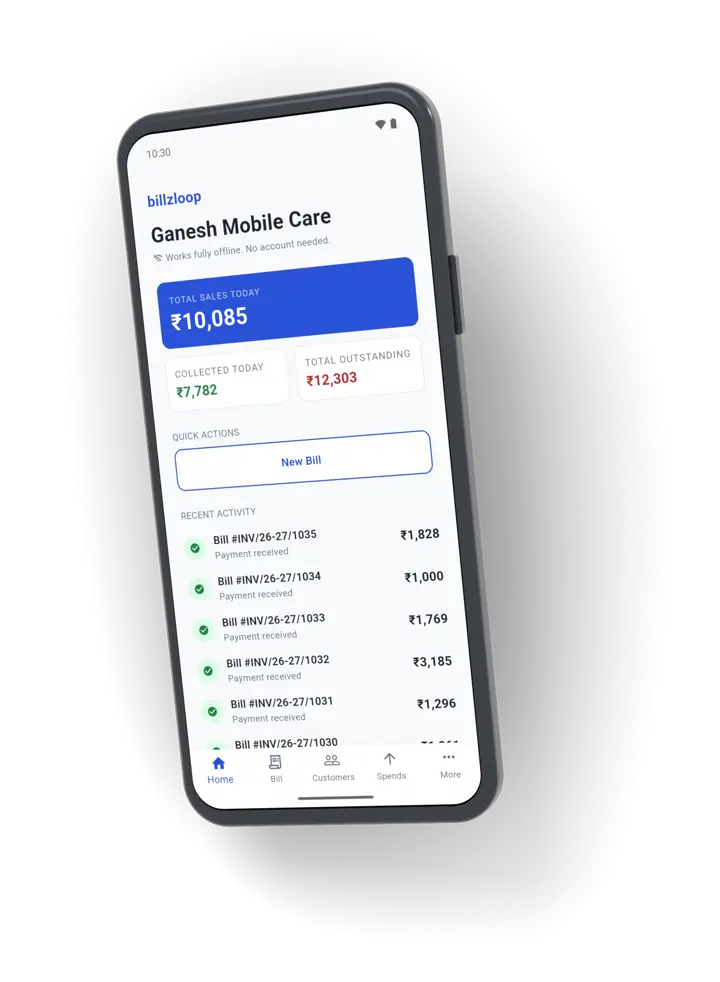
The billzloop home screen: today's sales, money collected today and money still outstanding
How it works

How to use billzloop

From bill to paid in three steps. Below them, every step of setting up and making a bill, with a short video of each.

  1. Make the bill

    Pick the customer and type the amount. Or add items, GST, a discount and a due date.

  2. Send it

    Share the bill as a PDF on WhatsApp, or print it. Add your UPI QR code so customers can pay you directly.

  3. Record the payment

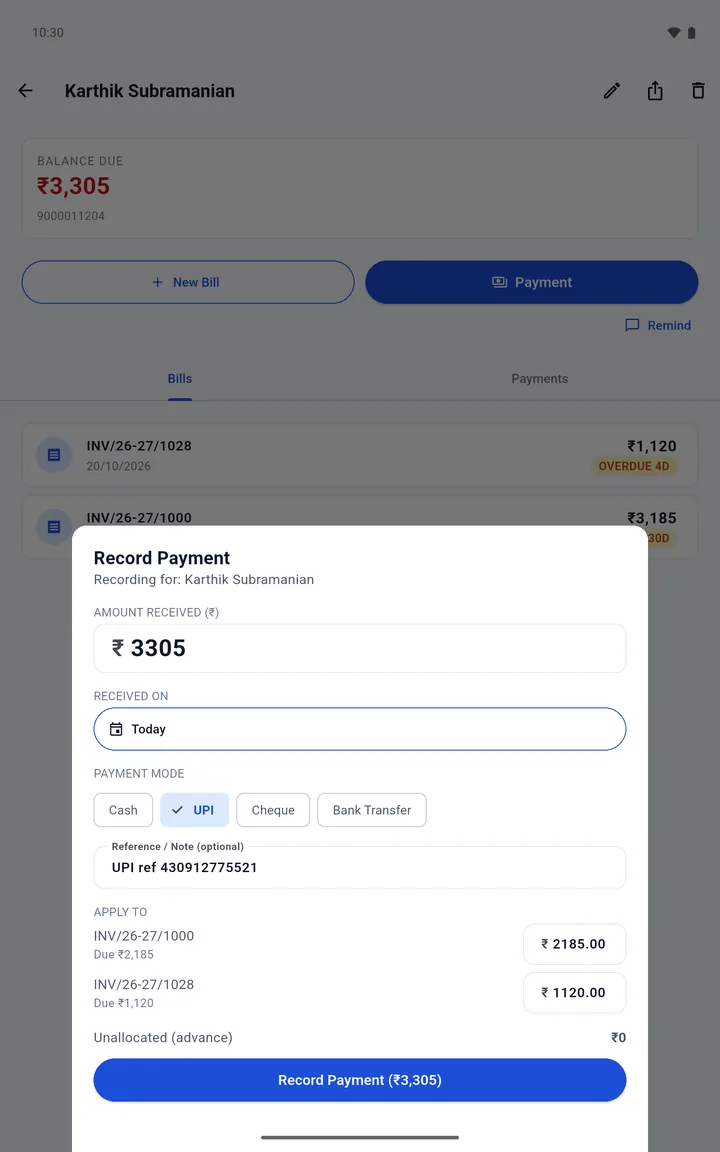
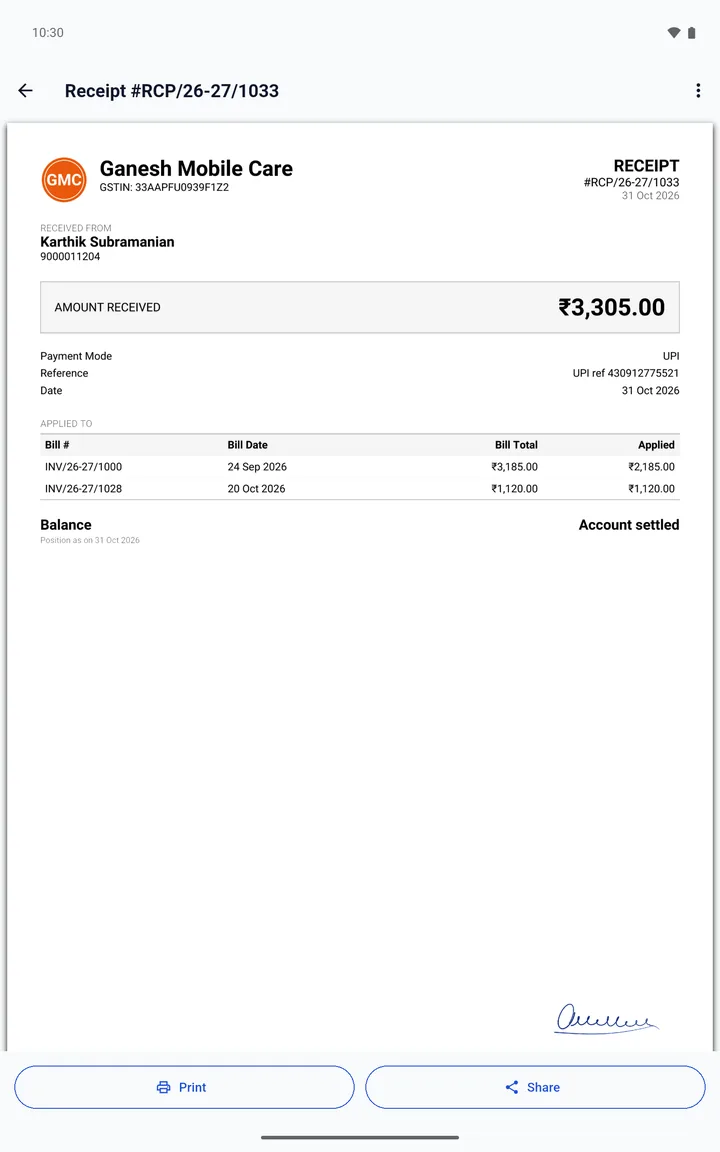
    Cash, UPI, cheque or bank transfer. billzloop keeps every customer's balance and gives each payment a receipt.

Set up your business

Do this once. You can skip any step and change it later in Settings.

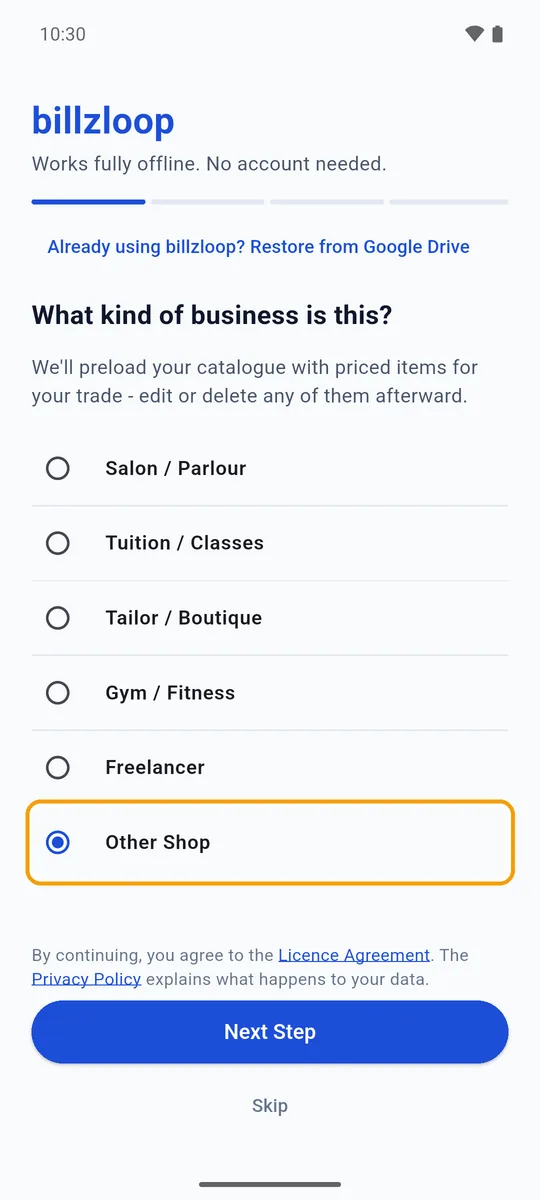
  1. The first set-up screen, 'What kind of business is this?', with Other Shop selected
    Step 1 of 7

    Pick your type of business

    Choose the closest match and tap Next Step. billzloop adds a few priced items for it to your Catalogue, which you can edit or delete.

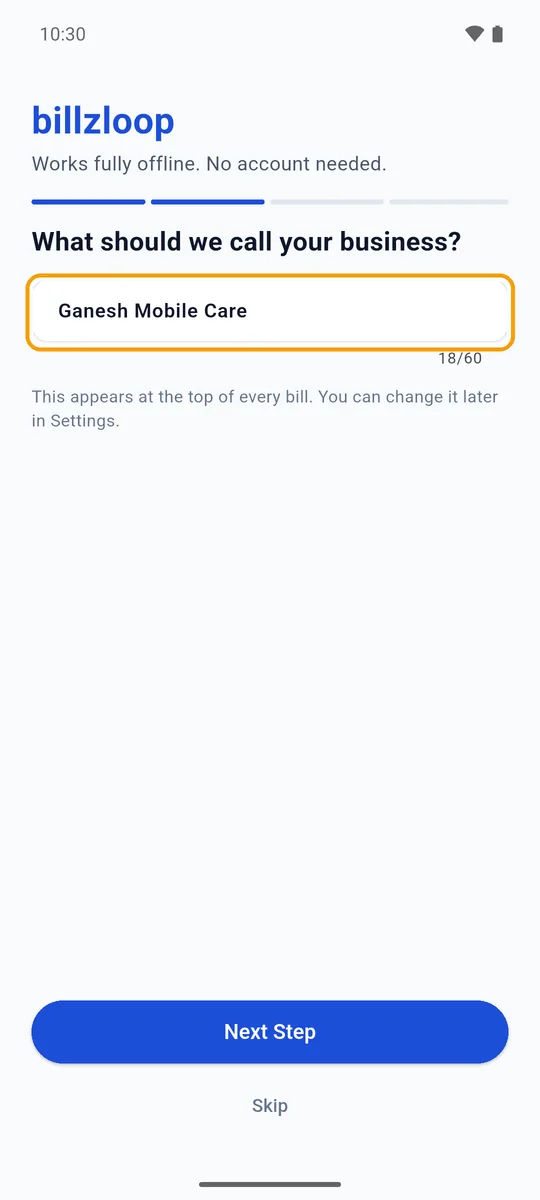
  2. The business name typed in: Ganesh Mobile Care
    Step 2 of 7

    Type your business name

    It prints at the top of every bill. Tap Next Step.

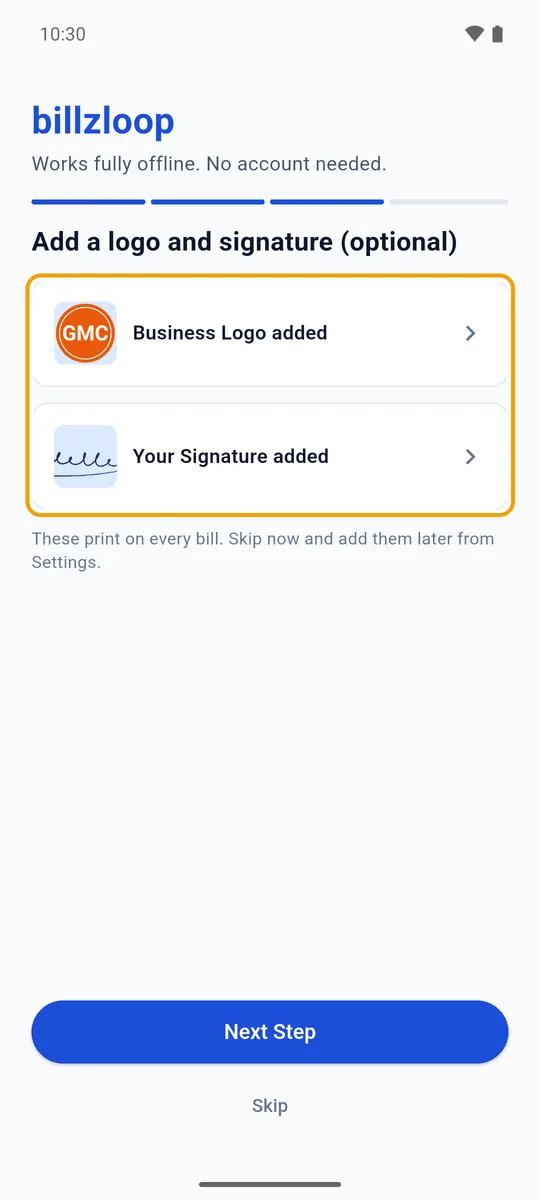
  3. Business Logo added and Your Signature added
    Step 3 of 7

    Add your logo and signature

    Optional. Pick each one from your photos. Both print on every bill.

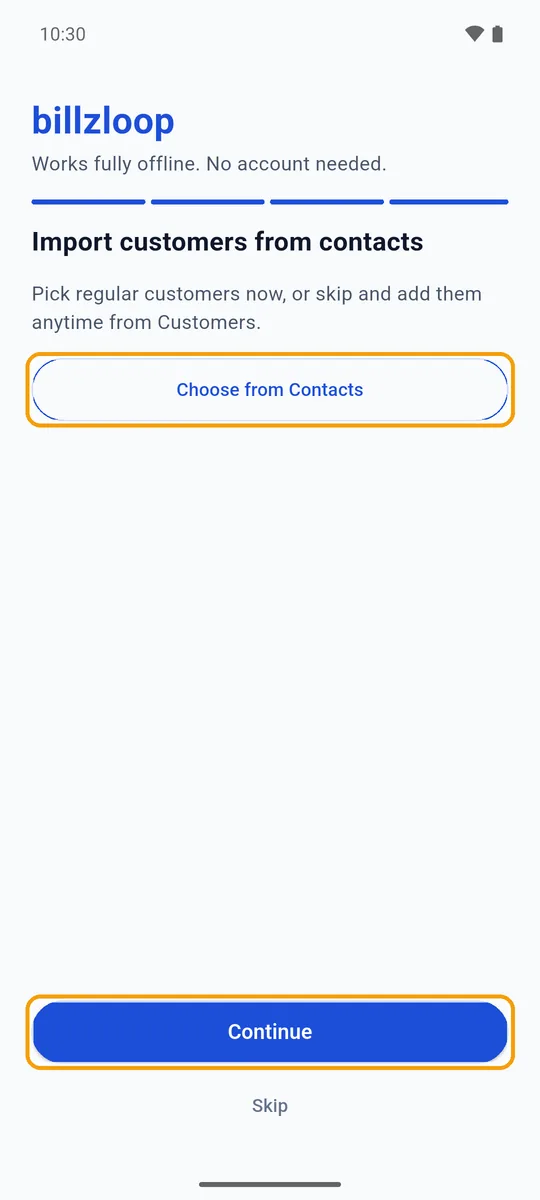
  4. Import customers from contacts, with Choose from Contacts and Continue
    Step 4 of 7

    Import customers, or skip

    Tap Choose from Contacts to add regular customers, or Continue to add them later.

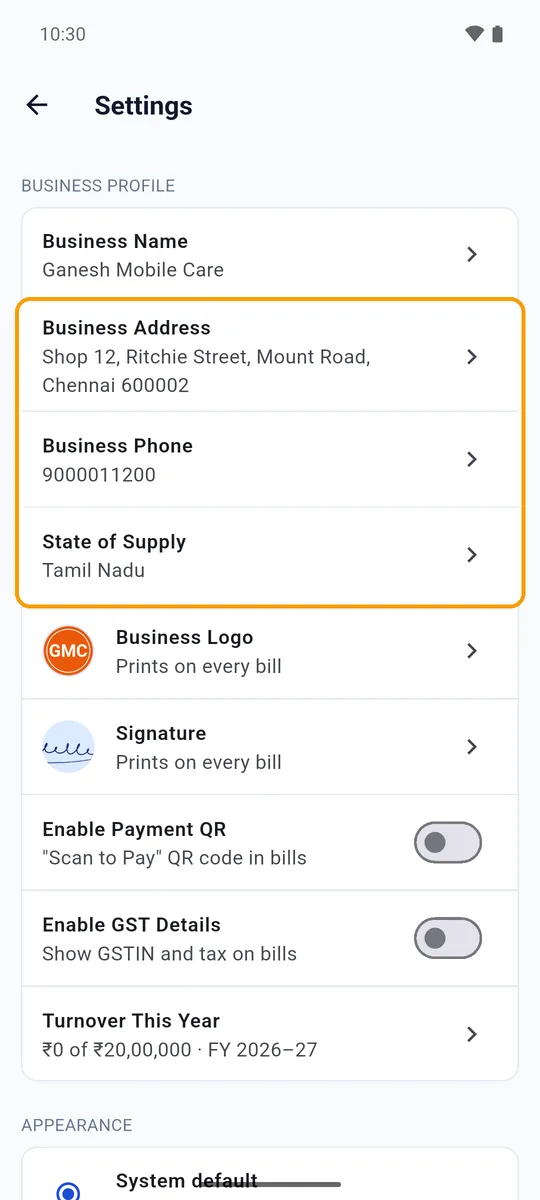
  5. Settings with the business address, phone and state of supply filled in
    Step 5 of 7

    Add your address, phone and state

    Go to More, then Settings. Fill in Business Address, Business Phone and State of Supply, and tap Save on each.

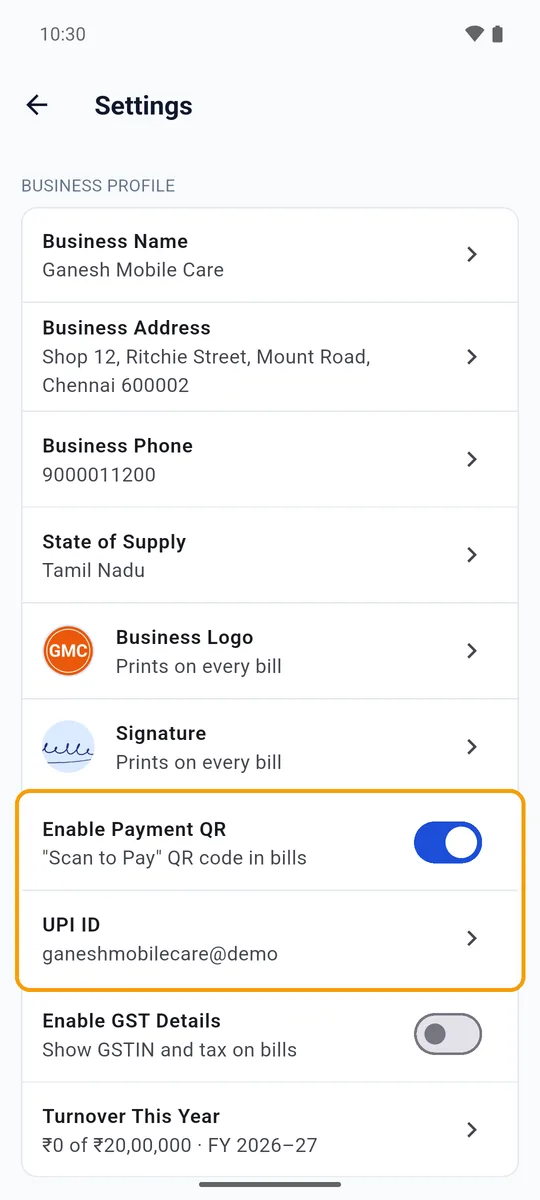
  6. Enable Payment QR switched on, with the UPI ID filled in
    Step 6 of 7

    Turn on the payment QR

    Switch on Enable Payment QR and enter your UPI ID. A bill with money still due then carries a QR code for that amount.

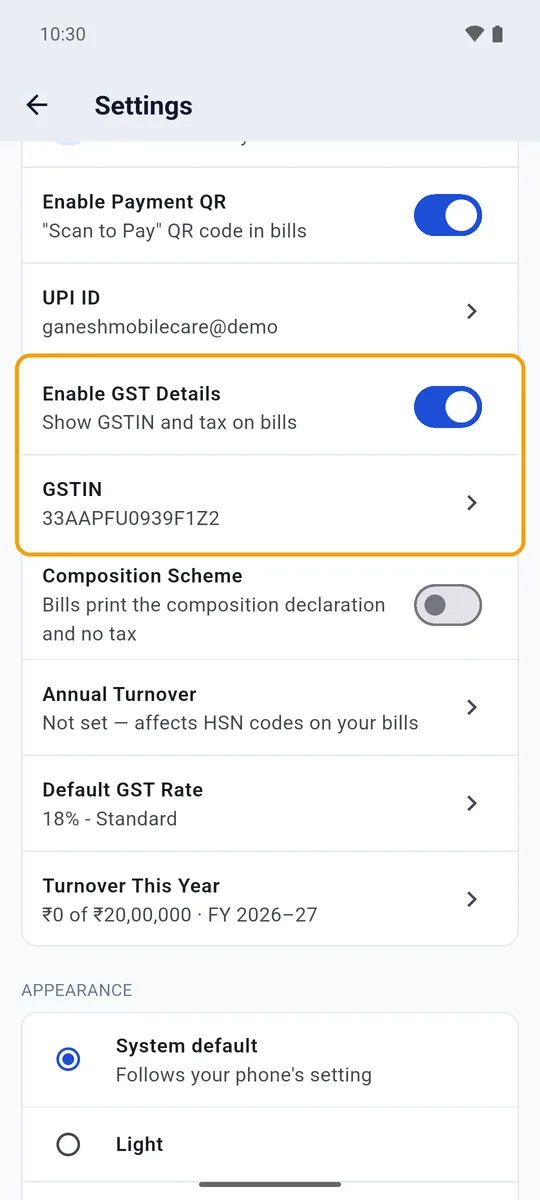
  7. Enable GST Details switched on, with the GSTIN filled in and a default GST rate of 18%
    Step 7 of 7

    Add your GSTIN

    Registered for GST? Switch on Enable GST Details and enter your GSTIN. If not, leave it off and your bills carry no tax.

Watch it in one go

About a minute, with no sound. Tap a step to jump to it.

Make a bill

A full bill with items and GST. For a single amount, choose Quick Bill instead.

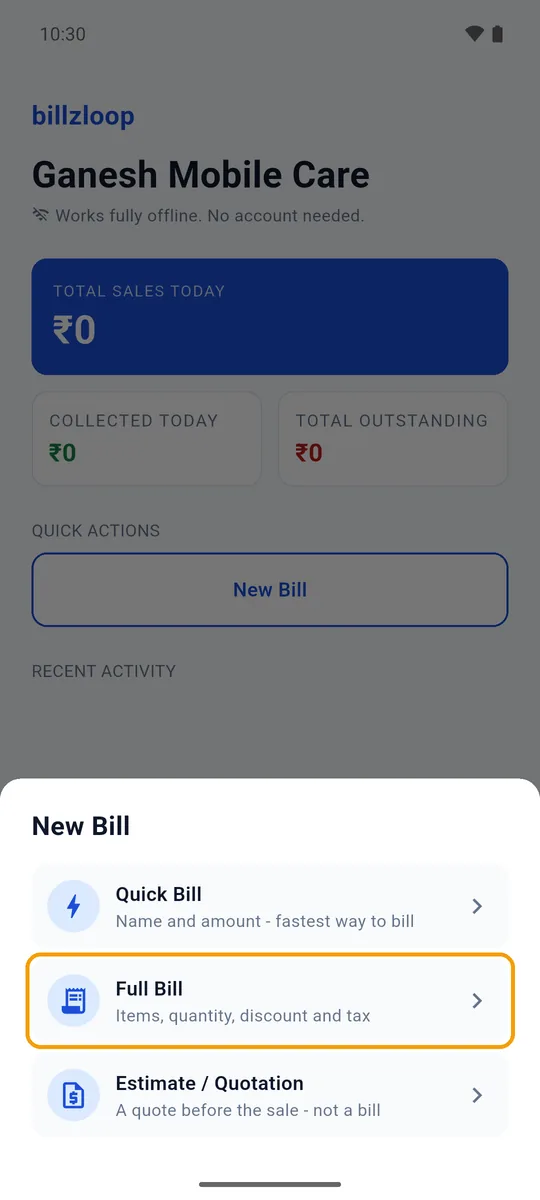
  1. The New Bill sheet with Quick Bill, Full Bill and Estimate / Quotation
    Step 1 of 6

    Tap New Bill, then Full Bill

    New Bill is on the Home screen. Full Bill takes items, quantity, discount and GST.

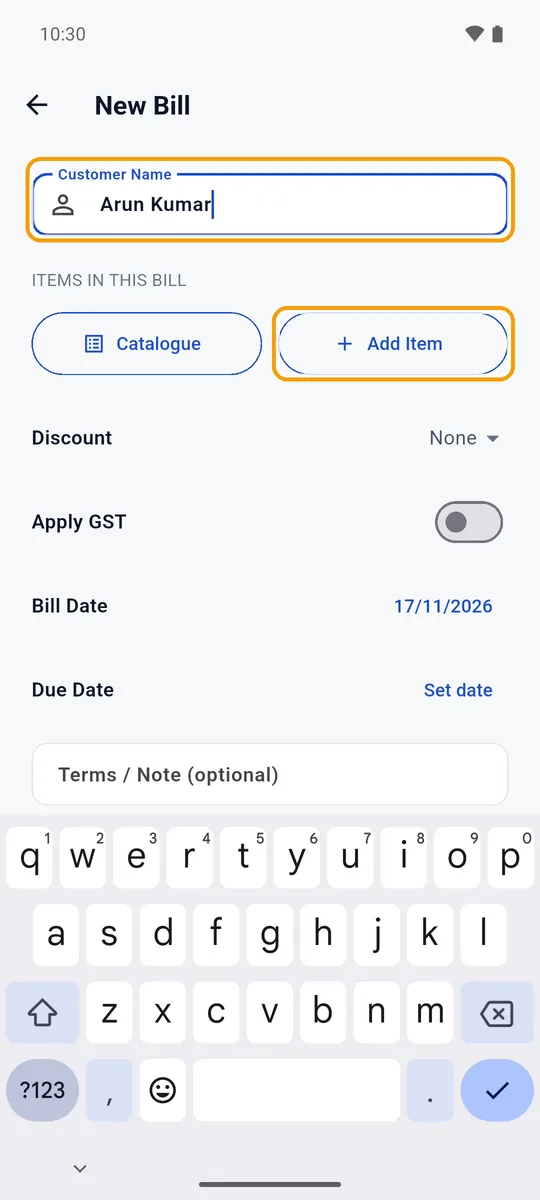
  2. The customer's name, Arun Kumar, typed in, with the Add Item button
    Step 2 of 6

    Type the customer's name

    Pick a saved customer or type a new name, then tap Add Item. Catalogue picks from your saved items.

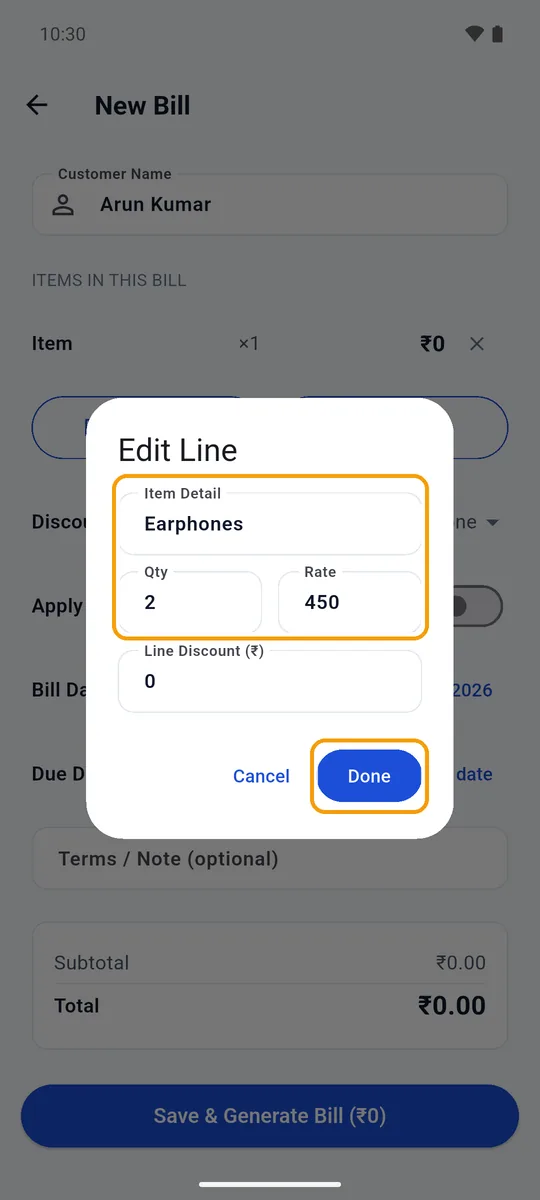
  3. The Edit Line box: Earphones, quantity 2, rate 450, and Done
    Step 3 of 6

    Enter the item

    Tap the new line. Type the item, quantity and rate, then tap Done. Add Item again for more lines.

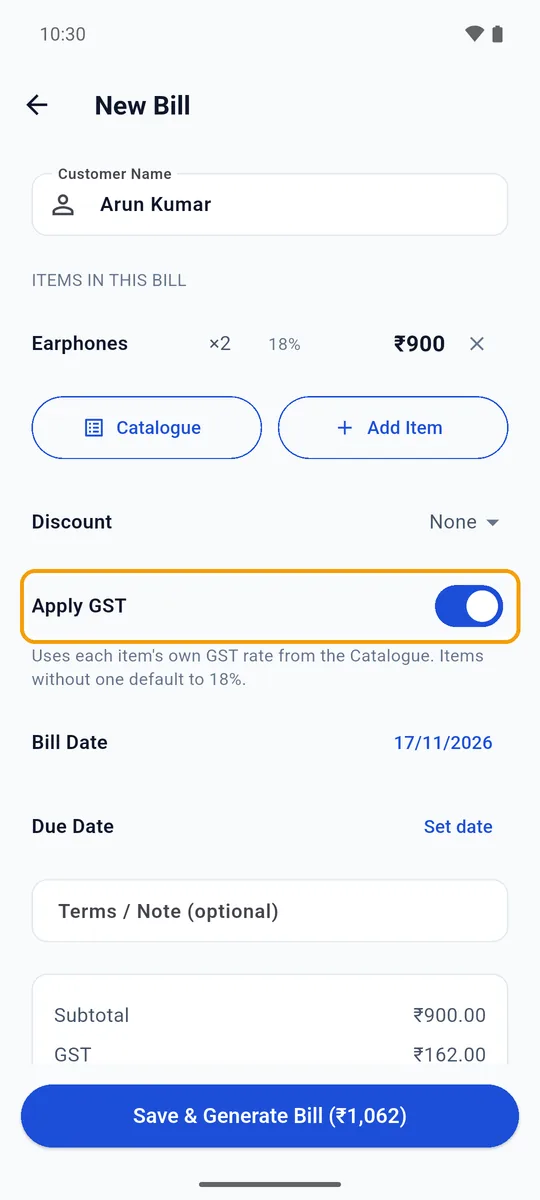
  4. Apply GST switched on: Earphones at 18%, GST of ₹162 on a subtotal of ₹900
    Step 4 of 6

    Turn on Apply GST

    For a GST bill, switch it on. Tax is added at each item's GST rate, or your default rate.

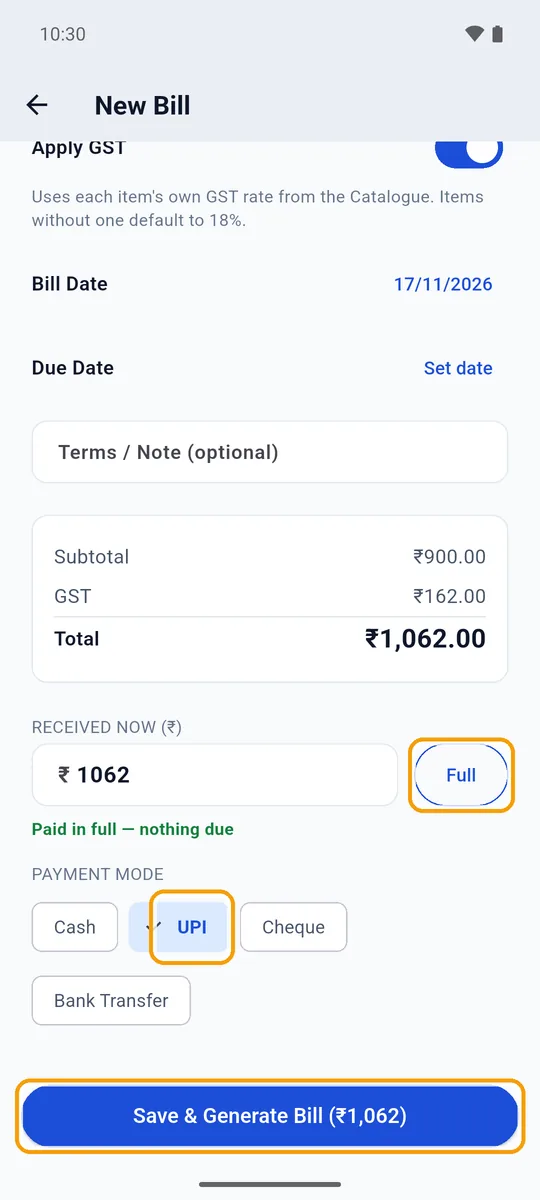
  5. Received now set to the full ₹1,062, paid by UPI, above Save & Generate Bill
    Step 5 of 6

    Record the payment and save

    Paid now? Tap Full and pick how they paid. Paying later? Leave it at 0. Then tap Save & Generate Bill.

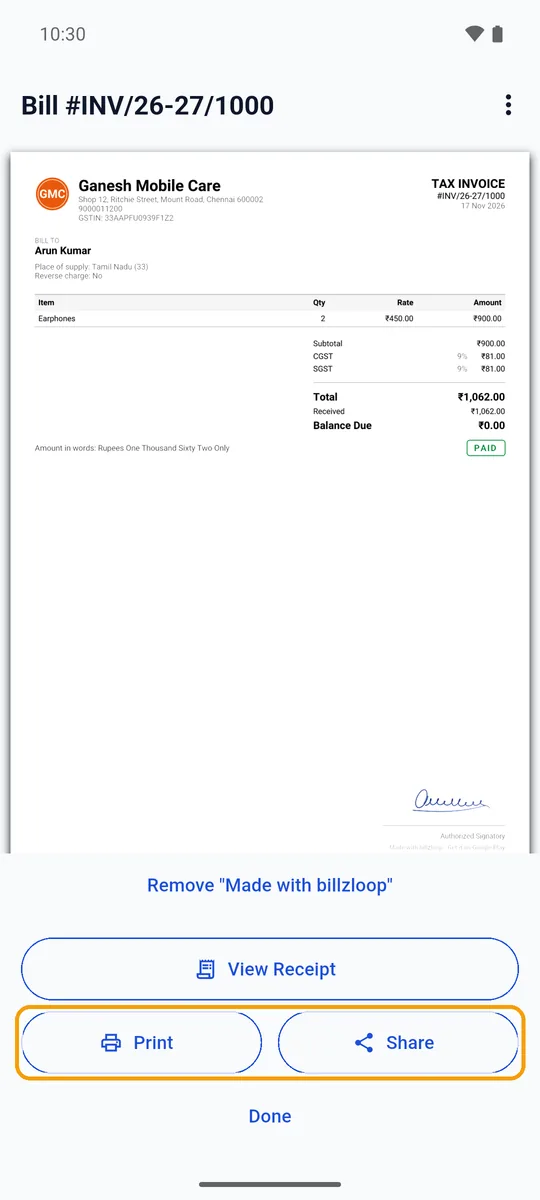
  6. The finished tax invoice for Arun Kumar, ₹1,062, marked Paid, with Print and Share
    Step 6 of 6

    Share or print it

    The bill is ready as a PDF. Tap Share to send it on WhatsApp, or Print.

Watch it in one go

40 seconds, with no sound. Tap a step to jump to it.

Features

Bills, payments and dues in one place

A GST billing app made for small businesses in India: rupees, GST and WhatsApp, with no sign-up.

Bills

A proper bill in seconds

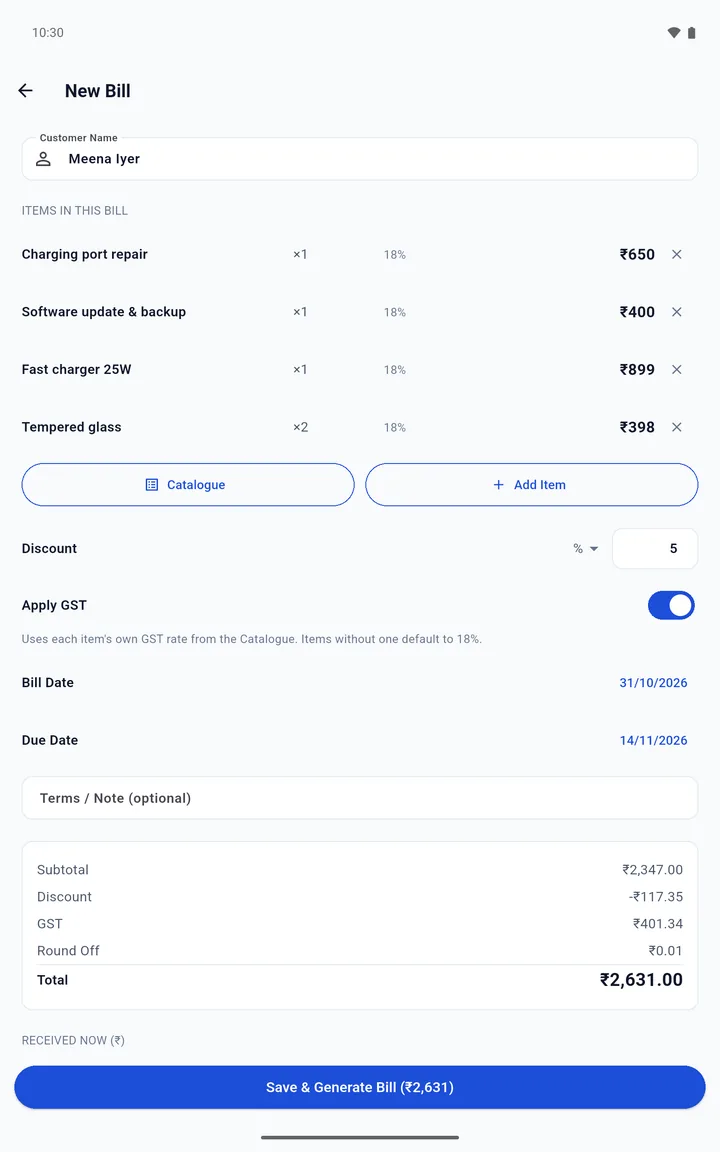
Use Quick Bill for a single amount, or Full Bill for items, quantity, discount, GST, due date and terms.

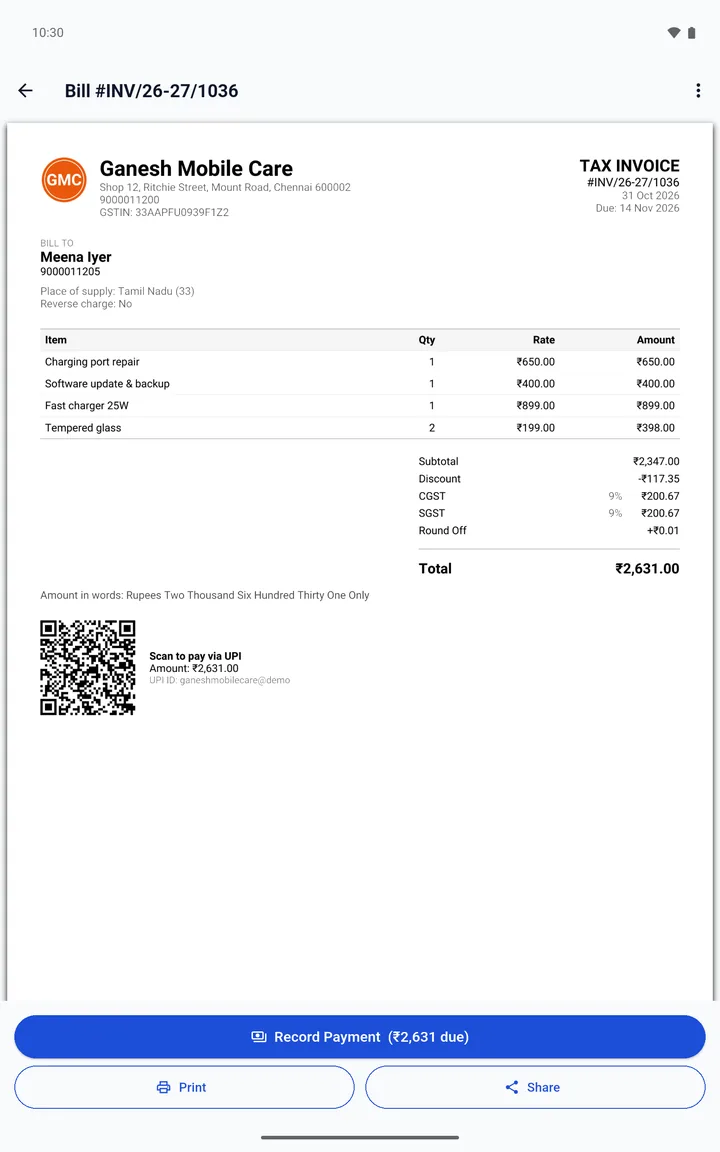
  • Tax invoice or bill of supply, with CGST + SGST or IGST
  • HSN/SAC codes, your GSTIN and place of supply
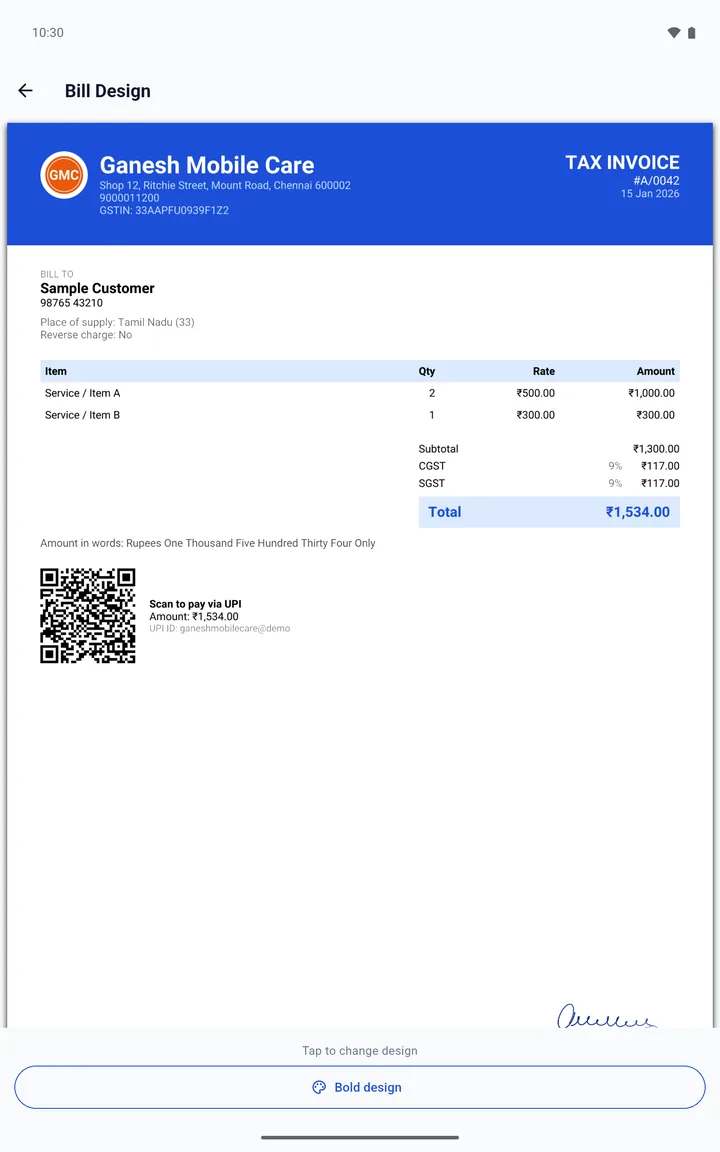
  • Your logo and signature on every bill
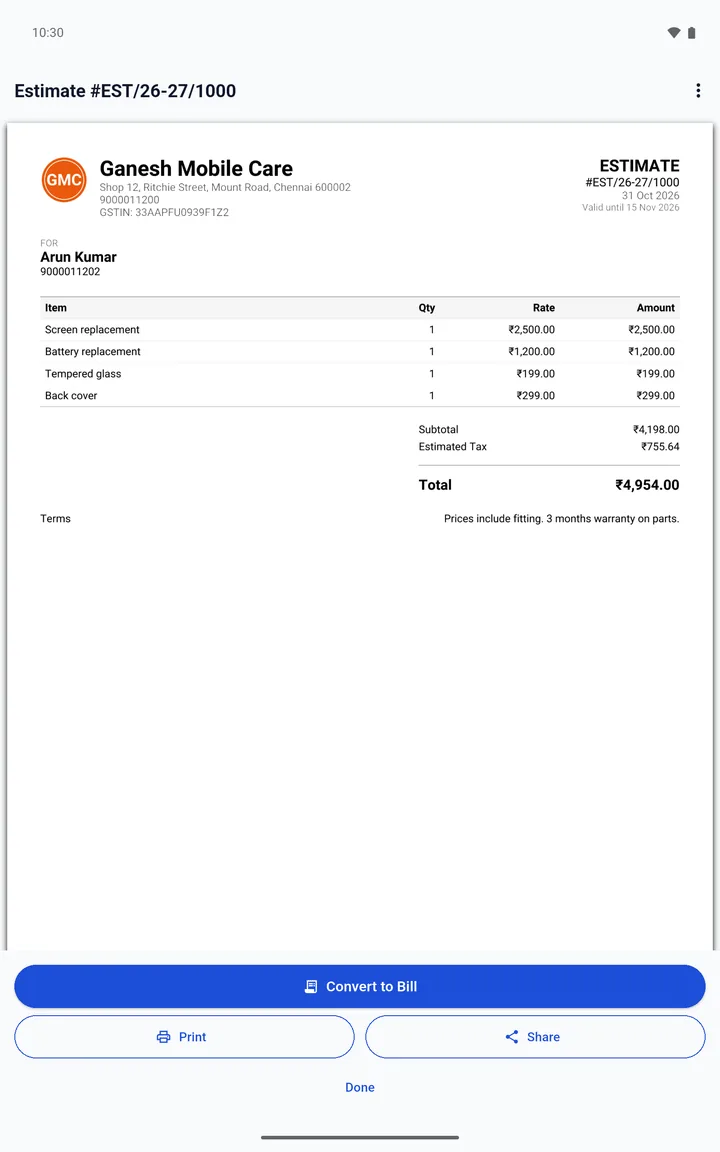
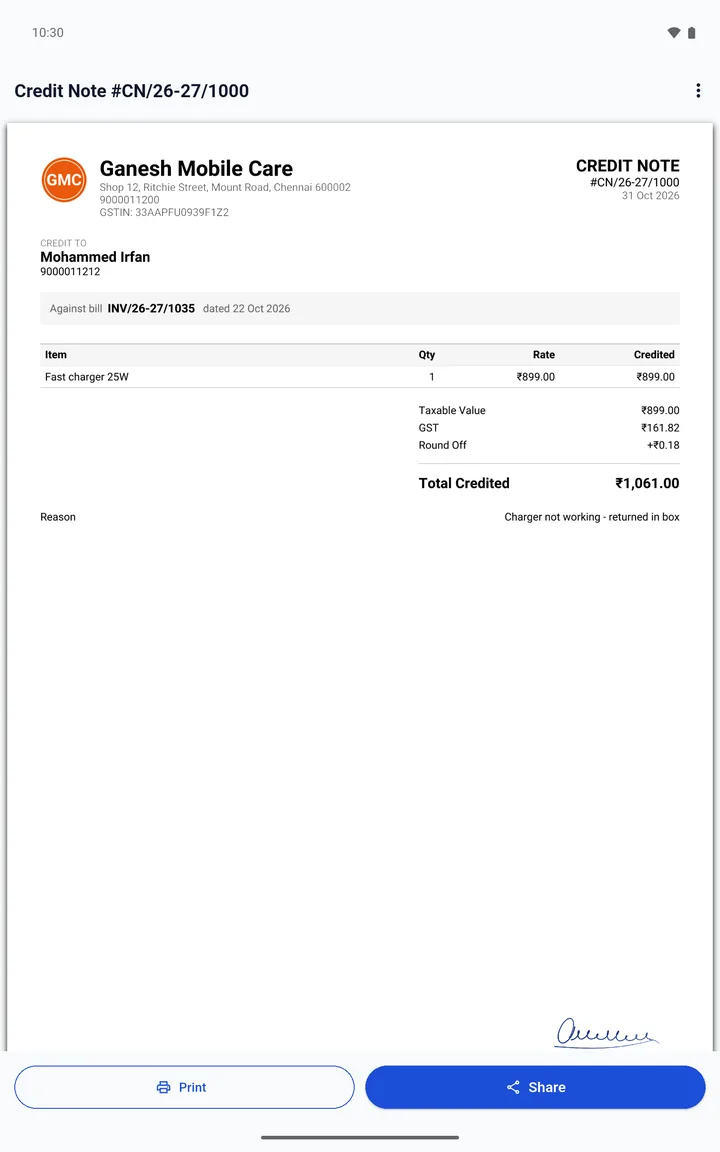
  • Estimates (quotations) and credit notes, each with its own number series
How to make a bill What a GST bill must show

Dues

Know who owes you

Customers are split into Pending and Settled, with how many days each one has been pending.

  • Sort by most owed or longest pending
  • Advances are kept and can be applied to a later bill
  • Share a statement of account: every bill, return and payment, with a running balance
Reminders

Remind on WhatsApp

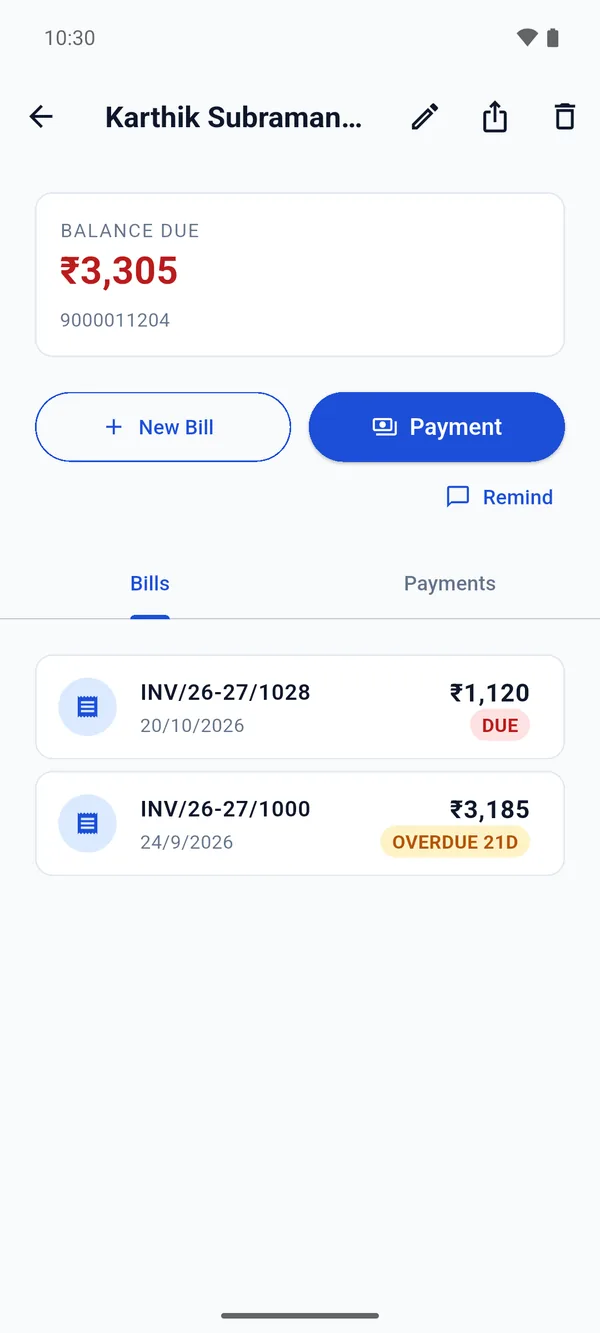
Tap Remind and WhatsApp opens with a message ready to go. Read it, change it if you like, and press send yourself.

  • Remind shows only when a customer owes you
  • Reminding is free
  • Write your own wording once, with Lifetime

Nothing is sent automatically. billzloop never contacts your customers on its own.

A customer's page with the balance due, New Bill, Payment and Remind
Insights

Spends and profit

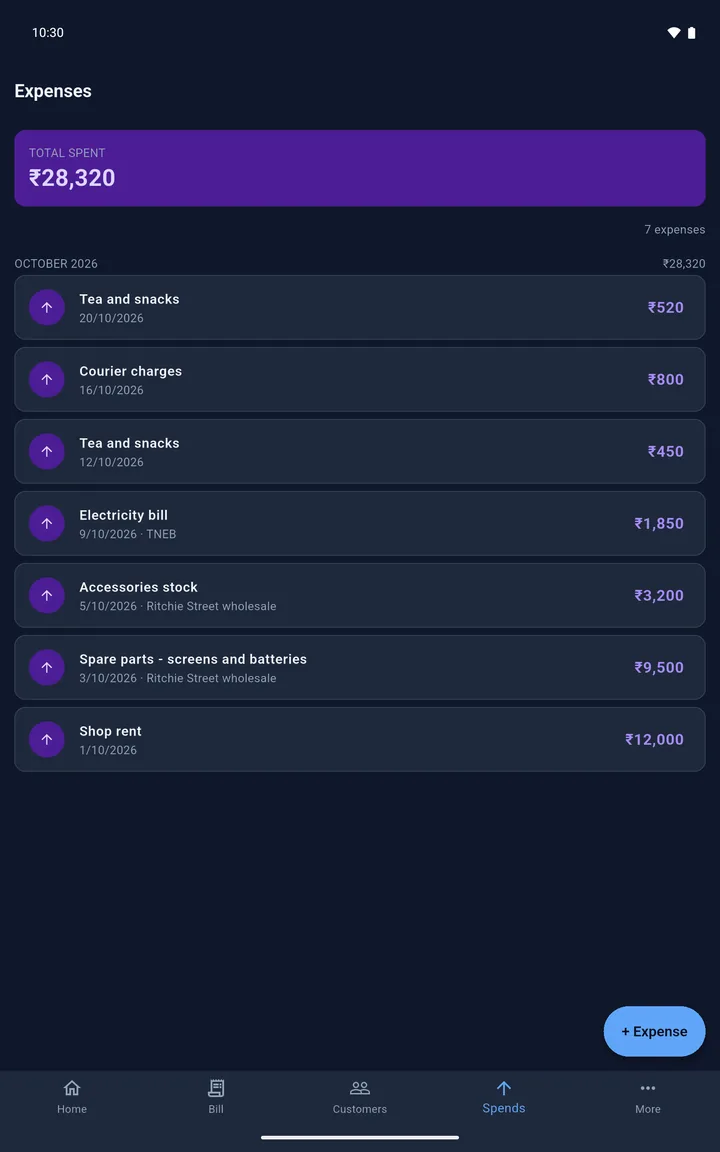
Log rent, stock and other spends as they happen. Then see what you sold, collected, spent and earned.

  • Today, this week, this month or any dates you choose
  • Your biggest spends and your top customers
  • Not registered for GST yet? billzloop warns you as your turnover nears the limit
A closer look

More features

Bill designs, UPI QR codes, estimates, receipts, credit notes and spends.

Private by design

Your business stays on your phone

billzloop has no server and no account. We never see your bills, your customers or your payments.

No sign-up

Nothing to register and nothing to log in to. Install it and start billing.

Encrypted on your phone

Records are kept in an encrypted database on the phone, and every backup is protected with a passphrase you choose.

Backups you control

Save a passphrase-protected backup file wherever you like, or back up to your own Google Drive.

No ads, no analytics

billzloop shows no ads, and has no analytics or tracking code of its own.

Pricing

Free to use. One optional unlock.

No subscription. Pay once, only if you want the extras.

Free

₹0

Everything you need to bill and get paid.

  • Unlimited bills, estimates and credit notes
  • Payments, receipts and customer balances
  • PDF bills on WhatsApp, printing and your UPI QR
  • Remind on WhatsApp
  • Spends and Insights
  • Backup to a file or to Google Drive

Bills carry a small “Made with billzloop” line.

FAQ

Questions

Is billzloop free?

billzloop is free for small businesses in India to use, with no limit on bills, estimates, receipts or credit notes, and no ads. Making bills, recording payments and reminding customers stay free.

Lifetime is an optional one-time unlock for ₹999. It adds the bill designs, a year-end package for your accountant, automatic Google Drive backup and your own reminder wording, and removes the "Made with billzloop" line from your bills.

Does billzloop need internet?

No. Bills, payments, PDFs, the customer ledger, Insights and the backup file all work offline. Only Google Drive backup, buying Lifetime and restoring a purchase need internet.

What happens to my data if I lose my phone?

billzloop keeps everything on your phone, so back up regularly: save a passphrase-protected backup file somewhere safe, or connect your Google Drive. Without a backup there is no other copy, not even with us.

How do I move to a new phone?

Back up on the old phone, then restore on the new one from the backup file or from Google Drive. If you bought Lifetime, use the same Google account and it comes back by itself when billzloop starts. If it doesn't, tap Restore Purchases in Settings.

How do I add GST to my bills?

In Settings, switch on Enable GST Details and enter your GSTIN and default GST rate. Bills are then headed Tax Invoice, with CGST and SGST, or IGST when the customer is in another state. Items can carry HSN or SAC codes. Under the Composition Scheme, bills are headed Bill of Supply and carry no GST. What a GST bill must show.

Can I use billzloop if I am not registered for GST?

Yes. Leave GST off in Settings and your bills are headed Invoice, with no GSTIN and no tax on them. billzloop warns you as your turnover nears the GST registration limit. Once you register, switch on Enable GST Details and add your GSTIN.

Can I make a quotation or estimate?

Yes. Tap New Bill and choose Estimate / Quotation. It has its own number series and never counts as a sale. When the customer accepts, Convert to Bill turns it into a real, separately numbered bill, already filled in, so nothing is billed twice. How to turn a quotation into a bill.

Can billzloop track udhar, the money customers owe me?

Yes. Every bill that is not fully paid adds to that customer's balance, and every payment you record reduces it. The Customers list shows who owes you and for how many days, and you can share a statement of account with a running balance. Tap Remind and WhatsApp opens with a message ready for you to send.

Is Lifetime a subscription?

No. You pay ₹999 once. It is tied to your Google account, not your phone, and lasts as long as billzloop is available on Google Play, unless the purchase is refunded.

Can I get a refund?

In the first 48 hours, Google Play may refund you under its own policy. After that, or if Google declines, we refund only if the unlock did not work and Restore Purchases in Settings did not fix it, or if it did not do what we said it does. Email contact@onezloop.com with your Play order ID. We do not refund because you changed your mind. A refund ends Lifetime; your bills and data are not affected. The Terms of Sale have the details.

Can I get a GST invoice for Lifetime?

Yes. Email contact@onezloop.com with your Google Play order ID, your GSTIN and your business's legal name, and we will send you one.

What if billzloop stops being published?

The app keeps working on your phone: it has no server and nothing that expires. You would lose future updates and support, not the app or your data.

How do I get help?

Email contact@onezloop.com. Support is free and best-effort for everyone, whether or not you bought Lifetime. In the app, Settings → Share Diagnostics adds the details that help, and you see the email before it is sent.

Is billzloop accounting software?

No. It's a billing app for bills, payments, dues and spends. It doesn't track stock or purchases, file GST returns, or replace a company's statutory books of account.

It runs on Android 7.0 or newer, and it's in English.

Make your first bill today

Free on Google Play. No sign-up.

Get it on Google Play